
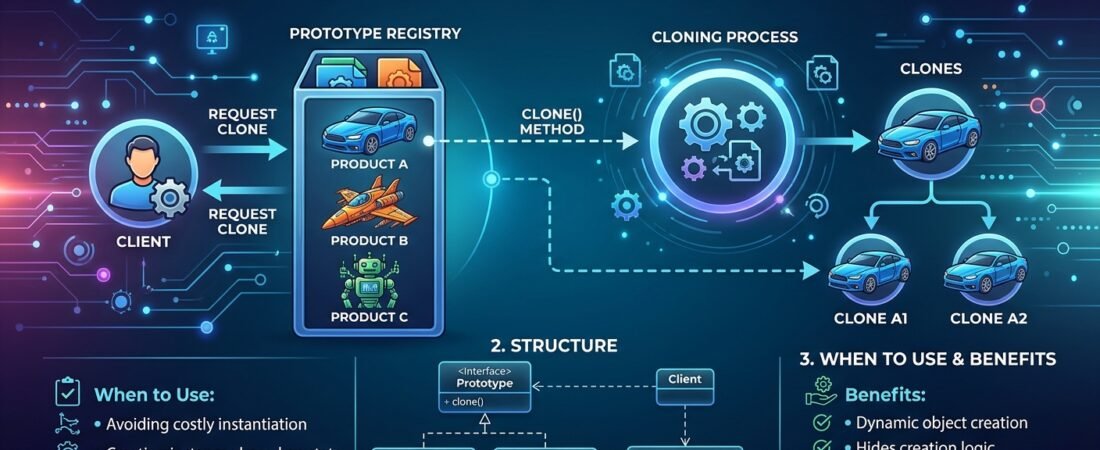
Prototype Pattern in Java: Cloning Instead of Constructing
The Problem
Sometimes creating a new object from scratch is expensive (deep object graphs, database lookups, complex configuration), but you already have a similar object at hand. The Prototype pattern lets you copy existing objects without making your code dependent on their concrete classes.
Diagram
%%{init: {'theme':'base', 'themeVariables': { 'primaryColor': '#eef2ff', 'primaryTextColor': '#1e293b', 'primaryBorderColor': '#818cf8', 'lineColor': '#94a3b8', 'secondaryColor': '#f0fdf4', 'secondaryBorderColor': '#86efac', 'tertiaryColor': '#fff7ed', 'tertiaryBorderColor': '#fdba74', 'background': '#ffffff', 'mainBkg': '#eef2ff', 'secondBkg': '#f0fdf4', 'tertiaryBkg': '#fff7ed', 'noteBkgColor': '#fff7ed', 'noteBorderColor': '#fdba74', 'actorBkg': '#eef2ff', 'actorBorder': '#818cf8' }}}%%
classDiagram
    class ProductSpecification {
        <<interface>>
        +clone() ProductSpecification
    }
    class BroadbandPlanSpecification {
        -String name
        -int speedMbps
        -List~Feature~ features
        +clone() ProductSpecification
    }
    ProductSpecification <|.. BroadbandPlanSpecification
Java Example
public interface ProductSpecification extends Cloneable {
    ProductSpecification copy();
}

public class BroadbandPlanSpecification implements ProductSpecification {
    private String name;
    private int speedMbps;
    private List<String> features;

    public BroadbandPlanSpecification(String name, int speedMbps, List<String> features) {
        this.name = name;
        this.speedMbps = speedMbps;
        this.features = new ArrayList<>(features);
    }

    @Override
    public ProductSpecification copy() {
        // deep copy of mutable fields
        return new BroadbandPlanSpecification(this.name, this.speedMbps, this.features);
    }

    public void setName(String name) { this.name = name; }
    public void setSpeedMbps(int speedMbps) { this.speedMbps = speedMbps; }
}
Usage — start from a base plan and derive variants without repeating setup logic:
BroadbandPlanSpecification basePlan =
        new BroadbandPlanSpecification("Basic Fiber", 100, List.of("Static IP"));

BroadbandPlanSpecification premiumPlan = (BroadbandPlanSpecification) basePlan.copy();
premiumPlan.setName("Premium Fiber");
premiumPlan.setSpeedMbps(500);
Quarkus Example
Prototype shows up in Quarkus when you need a fresh, pre-configured instance per request — for example, cloning a base @Dependent-scoped template bean rather than re-running expensive initialization:
@Dependent
public class OrderContextTemplate implements ProductSpecification {

    private final Map<String, Object> defaults = loadExpensiveDefaults();

    @Override
    public ProductSpecification copy() {
        OrderContextTemplate clone = new OrderContextTemplate();
        clone.defaults.putAll(this.defaults);
        return clone;
    }
}

@ApplicationScoped
public class OrderContextFactory {

    @Inject
    OrderContextTemplate template; // loaded once, expensive defaults cached

    public OrderContextTemplate newContext() {
        return (OrderContextTemplate) template.copy();
    }
}
Key Takeaways
- Use Prototype when object creation is costlier than copying, or when you need many similar-but-slightly-different objects.
- Watch out for shallow vs. deep copies — mutable fields (lists, nested objects) usually need explicit deep-copy logic.
- In CDI-based apps like Quarkus, Prototype often complements
@Dependentscope: keep one expensive template and clone it per use.